August 25, 2007
A lot has happened the last couple of weeks and I am really behind with a lot of things that I want to blog about. If you are familiar with the field that I am working in (SIEM, SIM, ESM, log management, etc.), you will fairly quickly realize where I am going with this blog entry. This is the first of a series of posts where I want to dig into the topic of event processing.
Let me start with one of the basic concepts of event processing: normalization. When dealing with time-series data, you will very likely come across this topic. What is time-series data? I used to blog and talk about log files all the time. Log files are a type of time-series data. It’s data which is collected over time. Entries are associated with a time stamp. This covers anything from your traditional log files to snapshots of configuration files or snapshots of tools that are run on a periodic basis (e.g., capturing your netstat output every 30 seconds).
Let’s talk about normalization. Assume you have some data which reports logins to one of our servers. We would like to generate a report which shows the top ten users accessing the server. How would you do that? We’d have to identify the user name in the log entry first. Then we’d extract it, for example by writing a regular expression. Then we’d collect all the user names and compile the top ten list.
Another way would be to build a tool which picks the entire log entry apart and puts as much information from the event into a database. As opposed to just capturing the user name. We’d have to create a database with a specific schema. It would probably have these fields: timestamp, source, destination, username. Once we have all this information in a database, it is really easy to do all kinds of analysis on the data, which was not possible before we normalized it.
The process of taking raw input events and extracting individual fields is called normalization. Sometimes there are other processes which are classified as normalization. I am not going to discuss them right here, but for example normalizing numerical values to fall in a predefined range is generally referred to as normalization as well.
The advantages of normalization should be fairly obvious. You can operate on the structured and parsed data. You know which field represents the source address versus the destination address. If you don’t parse the entries, you don’t really know that. You can only guess. However, there are many disadvantages to the process of normalization that you should be aware of:
- If you are dealing with a disparate set of event sources, you have to find the union of all fields to make up your generic schema. Assume you have a telephone call log and a firewall log. You want to store both types of logs in the same database. What you have to do is take all the fields from both logs and build the database schema. This will result in a fairly large set of fields. If you keep adding new types of data sources, your database schema gets fairly big. I know of a SIM which uses more than 200 hundred fields. And still that doesn’t cover nearly all the fields that are needed to cover a good set of data sources.
- Extending the schema is incredibly hard: When building a system with a fixed schema, you need to decide what your schema will look like. If, to a later point in time, you have a need to add another type of data source, you will have to go back and modify the schema. This can have all kinds of implications on the data already captured in the data store.
- Once you decided to use a specific schema, you have to build your parsers to normalize the inputs into this schema. If you don’t have a parser, you are out of luck and you cannot use that data source.
- Before you can do any type of analysis, you need to invest the time to parse (or normalize) the data. This can become a scalability issue. Parsing is fairly slow. It generally applys regular expressions to each of the data entries, which is a fairly expensive operation.
- Humans are not perfect and programmers are not either. The parsers will have bugs and they will screw up normalization. This means that the data that is stored in the database could be wrong in a number of ways:
- A specific field doesn’t get parsed. This part of the data entry is not available for any further processing.
- A field gets parsed but assigned to the wrong field. Part of your prior analysis could be wrong.
- Breaking up the data entry into tokens (fields) is not granular enough. The parser should have broken the original entry into more specific fields.
- The data entries can change. Oftentimes, when a new version of a product is released, it either adds new data types or it changes some of the log entries. This has to be reflected in the parsers. They need to be updated to support the new data entries, before the data source can be used again.
- The original data entry is not available anymore, unless you are spending the time and space to store the original data entry along with the parsed and extracted fields. This can have quite some scalability issues as well.
I have seen all of these cases happening. And they happen all the time. Sometimes, the issues are not that bad, but other times, when you are dealing with mission critical systems, it is absolutely crucial that the normalization happens correctly and on time.
I will expand on the challenges of normalization in a future blog entry and put it into the context of security information management (SIM).
[tags]SIM, SIEM, ESM, log management, event normalization, event processing, log analysis[/tags]
August 16, 2007
We have another BaySec meeting scheduled for the coming Monday. 7pm at O’Neills, at 3rd and King Street. Right around the corner from my work 😉
August 7, 2007
I thought I’d already disabled mDNSResponder when I did some basic hardening of my Laptop. Turns out that when Marty (no, I am not refereing to myself in the third person) asked me whether I disabled it and I checked again, it was really not. Maybe I just killed the process, but here is how to really disable that service:
Launch the following command
sudo launchctl unload /System/Library/LaunchDaemons/com.apple.mDNSResponder.plist
The next step is turning off the mDNSResponder at startup. And where do you do that? As I am not really confident getting online here at BlackHat, I decided to just look around on the hard drive and what I found was that you could probably just change an entry in the /System/Library/LaunchDaemons/com.apple.mDNSResponder.plist file:
<key>OnDemand</key>

<false></false>
Replace false with true. Do you notice something? Someone really knew XML. Darn it. Two elements. One being the key, the other one being the value. Ever heard of attributes in XML? To whoever built this, this is how I would write the entry:
Or even better, re-architect the entire XML file to actually make sense!
I just now found the real way to actually disable the service by using the -w flag on the launchctl command from above. That will turn the process off permanently. A good reference is here.
August 6, 2007
No! OS X is not FreeBSD! Not sure if I’d like OS X better, if it was just FreeBSD on steroids.
I am sitting at BlackHat. Yes, I turned my laptop on, but the network interfaces are turned off! I was going to configure my firewall to lock everything down and then go online. First shock: <b>ipfw</b> is the firewall OS X uses. There is some history with me and ipfw. I am a big fan of OpenBSD and when Daniel wrote the pf firewall to replace ipfw , I was delighted. I started using pf and even fiddled around with the source code. I am no expert on all the features anymore, but I got a pretty good handle on that beast at some point. Now I have to learn ipfw… Okay. Let’s do that and face the challenge.
First things first. Where’s the configuration file for it? Hmm… There is a guy. Let me play with that. I am shocked. By default, UDP traffic is allowed in and out, even if you turn off all your services in the main tab. Only if you use the advanced tab, can you turn UDP off. Logging is not turned on either (what a surprise). Alright, I am turned that on too. How do the rules look now? OMG! Ridiculous. It allows port 5353, 137, 427, and 631 inbound! Why? Turn that off! Lesson learned: Don’t use the default config. Again, show me the configuration file. But where is it?
I still haven’t found it. I am just going to write a script which uses the <b>ipfw add</b> command to add ipfw rules one by one. That’s really the same thing I am doing with iptables on my Linux boxen. But before doing so, I wanted to see how ipfw log entires look. To test that, I added the following rule:
<code>deny log ip from any to any</code>
I just wanted to see how a log entry looks when I telnet to some port on my box. Well. Surprise surprise. Right after adding that rule not much worked anymore. <b>sudo</b> is not functioning anymore. Some digging around and I realized that the <b>/etc/passwd<b> file is not used for authentication! It’s some service that uses the loopback interface. Not really sure what to do without sudo and a bit frustrated, I closed the laptop to resume later. Well, later, the laptop did not wake up anymore. Authentication gone! It just hung. A reboot was necessary. Darn. At this point I am really frustrated!
I think my next step is to go out and take Jay’s Bastille Linux scripts to see what they are going to do to my box. I actually hope Jay is going to show up here in Vegas so I can bug him about some of my OS X things 😉
[tags]OS X,ipfw[/tags]
July 29, 2007
Effective immediately, I have a new employer! I am leaving ArcSight to start working for Splunk, an IT search company in San Francisco. As their Chief Security Strategist, I will be working in product management, with responsibility for all of the UI and solutions.
The work I have been doing in my past with log management and especially visualization is going to directly apply to my new job. I will be spending quite some time to help further the visual interfaces and define use-cases for log management. Exactly what I’ve been doing for the last four years already 😉
Please don’t send me any emails to my arcsight email anymore. My new address:
raffy at splunk . c o m
I found out that a lot of the Splunk developers hang out on IRC (#splunk). I’ve been hanging out in there for the last couple of days. Maybe you can catch me there too 😉
These Splunk guys are funny. One of the first things they did is giving me a Mac book. Darn. I have never used a Mac before. This is crazy. All the little things I had developed and installed on my Linux boxen I now have to translate to OS X. I am slowly getting used to this beast, but there are still things I wasn’t able to figure out. Maybe some of you want to help me out?
- The first thing that I did was looking for something to cover the built-in camera. I don’t trust this thing. Who knows who’s watching 😉 I finally found the iPatch. Unfortunately they are out of stock. Well, I just built my own …


- Then I discovered that the plugs I have for the microphone and headphone jacks are not working either. They are slightly too big. Well, I will have to talk to Josh about that during DefCon 😉

- Then the other thing that I am struggling with is logging and auditing. I used tcpspy before to log all the connections that are opened to and from my machine. I downloaded the source and started compiling. No luck. Here is the error during compilation. Anyone know how to fix this?
tcpspy.c: In function 'ct_read':

tcpspy.c:236: error: 'TCP_ESTABLISHED' undeclared (first use in this function)
- Maybe there is another tool that I can use to record all the connections? The nice thing about tcpyspy is that it also logs the application that opened or accepted the connection and the user associated with that.
- What do I do about auditing? Are there instructions somewhere on how to enable either BSM auditing for Mac OSX or is there something else? I would like to mainly audit access to critical files on my box.
- There are all kinds of other little odd things, but these are the items bugging me right now 😉
See ya all at BlackHat! Hit me up so we can meet up!
July 25, 2007
I haven’t written about UNIX scripting in a while. It was yesterday in the afternoon that our QA guy came over and asked me some questions about VI. Among his problems was the “parsing of an XML” file. He wanted to extract elements from specific branches of an XML structure. I told him that VI was not XML aware. It treats XMLs just like any other text file; line by line. He was not happy with my answer and kept bugging me. Then he said: “You should write a tool called XMLgrep”. And that was it. I was pretty sure that someone had written a tool that would do exactly that.
After 30 seconds on google, I found it: XMLStarlet. It took me about 30 minutes to get the hang of the tool, but it is really cool. It takes XPATH queries as an input. My knowledge of XPATH goes back to my thesis and is a bit rusty, but I finally got it right. Here is an example of how to apply an XPATH query to an XML file:
xmlstarlet sel -t -c "/archive/ActiveList[@name='Public Webmail']/description" JSOX_ActiveLists.xml
another one:
xmlstarlet sel -t -m "/archive/ActiveList" -v "concat (@name,'

')" JSOX_ActiveLists.xm
Yes, there is a newline in this command. However, it didn’t really work for me. What I wanted to do is separating the different outputs with a newline, but for some reason this didn’t work. I tried all kinds of things, but no luck. Oh well.
Here is another link that might be useful. It’s a nice tutorial on XMLStarlet.
[tags]xml,parsing,command line,xpath,xmlstarlet[/tags]
July 18, 2007
Bob Blakley from the burton group wrote a blog entry about event interoperability standards. This clearly shows that interoperability is a hot topic. However, it also shows that we (CEE) still have to do a lot of work educating the community ;)I want to correct some of Bob’s statements about CEF and provide some more information and thoughts:
- “CEF defines only a record format”. Well, that’s absolutely right and very very intended. You do not HAVE to define anything else. The transport for example is something that should not depend on the syntax and vice versa. I keep haing to make that point. The ArcSight CEF standard is not bound to any transport. Use anything. If you don’t have anything better, use syslog. It is very very very easy to implement. You just marshall a packet, send it to port 514 and done. Yes, it’s not reliable and all, but it’s a very simple and quick start. If you want, use something more complicated and with more capabilities. CEE will be doing exactly the same thing. We’ll break the standard up into four subtypes, separating syntax from transport, recomendation, and taxonomy.
-  “it doesn’t define service interfaces to allow event producers to notify event consumers that an event has been created and is ready to be processed”. Wow, this is interesting. Why would you not just send the event? Why going asynchronous? People, get away from the notion of pulling events!
- “it does not contain any mechanism for dealing with clock synchronization issues in distributed environments”. Since when should an interoperability standard take care of synchronizing clocks? Use NTP. I am just assuming that! The standard should not have to talk about that!
- “[…] CEF leaves the definition of event types (which are called “Signature IDs†[…] ) up to the individual event producers, thus inviting both ID conflict issues and proliferation of different names for events of the same type in different systems.” Half of this is definitely wrong. The other half is again a separation issue. CEF is a syntax standard. Not a taxonomy! Furthermore, you use a combination of deviceVendor, deviceProduct, deviceVersion, and SignatureID for the unique ID. Hence, no overlapping IDs. I know where this is going. Have a look at CPE. Darn, that thing is complex. However, compeltely unnecessary in this case. Let people define their own IDs. They have them already anyways (except for most syslog entries, but there you just make an ID up). I know what I talk about. I have been doing all of this for the last 4 years! What is really missing in the critique is (and yes, I will admit that there are wholes in CEF) that the granularity of defining the signature IDs is not defined. For example, do you use the same ID for all logins? Failed and successful? The answer here is no. I need different ones, but that’s something CEF does not define. Be assured, CEE will!
I also disagree with Bob that multiple standards should be pursued and supported. I will definitely push CEE harder than CEF. It’s open, it’s a community effort, it’s Mitre led, and it’s going to be a more comprehensive approach. We are keeping NIST and all the other interested parties involved. No need for NIST to go out and create yet another standard. There are so many other standards out there also and just because they exist does not mean they are any good. For example XDASÂ is not what I want to see standardized! Why? See my review of XDAS.
[tags]CEE, CEF, event interoperability, standard, event exchange[/tags]
July 12, 2007
Today I was booking my airline ticket to Kualalumpur, Malaysia for my trip to Hack in the Box in September. I called the sales lady for the airline and talk to her about my flight dates and all that. In the end she asks me for my credit card information. Number, expiration date, and then the CVV number on the back of my card (the security code, as it is called sometimes too). I hesitate for a second, trying to remember what I just learned from the PCI auditors we had in house. I couldn’t really remember when a merchant needed that number, but after a second I realized that it would be okay to give it to her. It’s about the same as on a Web page, where you enter that information. They can use the CVV to run a authorization with the credit card company. Well, I thought that would be it. Wrong!
A couple of hours later I get a pretty ugly Excel spreadsheet back. I am asked to print it out, sign it, and fax it back to them. I had a look at the form and I wondered what was going on. Well, there was all my information in this spreadsheet, including CVV number! They even “encrypted” my credit card number in the spreadsheet. I am just kidding. It was all in plain text. The only funny thing was that the credit card number field was not formatted as a string, but a number, so it looked like it was encrypted. *grins*. But back to serious. I was quite upset. All my information in this document. I have to assume that this excel document is on the sales person’s desktop, along with probably dozens of others. Hmmm… Maybe I should send an email with a link that points to a site that contains a … Let’s not even go there.
The next thing I did was digging up the PCI standard. And here it was, section 3.2.2:
3.2.2 Do not store the card-validation code (Three-digit or four-digit value printed on the front or back of a payment card (e.g., CVV2 and CVC2 data))
A clear violation! And you know, this is pretty much the first thing you should address; the way of authorizing credit card transactions. Just plain wrong! Darn!
I wrote them an email asking for a contact in their security department. So far, no luck, just the sales person telling me that she needs all that information to complete the transaction. Whatever. Either she needs my signature, but then no CVV, or the CVV and no signature. But not both! I wonder how this is going to continue.
[tags]pci, compliance, vioaltion,security[/tags]
July 10, 2007
<disclaimer>This post is not 100% serious</disclaimer>
The mere fact that I have to put a disclaimer here is sort of funny. I guess I don’t want to discuss a topic and then people come back calling me names 😉
At the FIRST conference last month in Spain, I was talking to Ben Chai for a while and he was recording the talk, as well as summarized some of the discussion in a blog entry. We talked about log analysis of huge amounts of data. I guess I came up with the idea of cubing logs to approach the problem, which uses log visualization of subsets to help the analyst.
[tags]visualization, log cubing, log analysis[/tags]
June 18, 2007
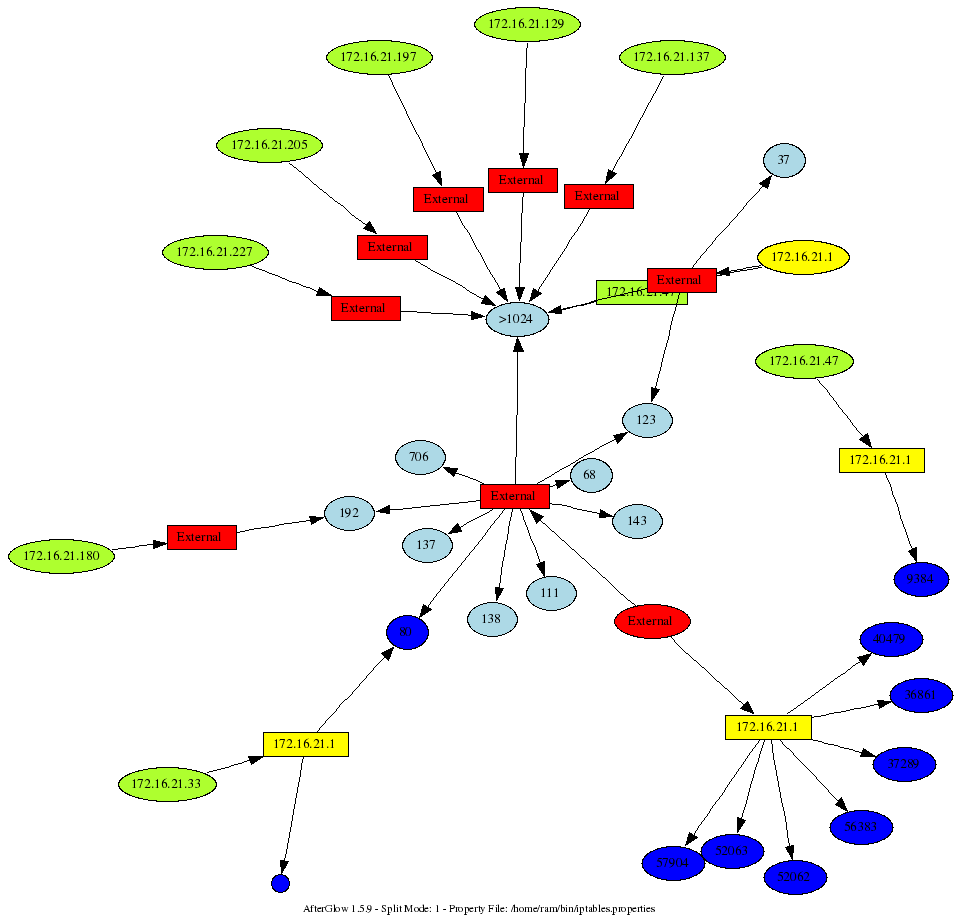
I am sitting in Seville, at the First conference, where I will be teaching a workshop on Wednesday. The topic is going to be insider threat visualization. While sitting in some of the sessions here, I was playing with my iptables logs. Here is a command I am running to generate a graph from my iptables logs:
cat /var/log/messages | grep "BLOCK" | perl -pe 's/.*\] (.*) (IN=[^ ]*).*(OUT=[^ ]*).*SRC=([^ ]* ).*DST=([^ ]* ).*PROTO=([^ ]* ).*?(SPT=[^ ]+ )?.*?(DPT=\d* )?.*?(UID=\d+)?.*?/\1,\2,\3,\4,\5,\6,\7,\8,\9/' | awk -F, '{printf "%s,%s,%s\n",$4,$5,$8}' | sed -e 's/DPT=//' -e 's/ //g' | afterglow.pl -e 1.3 -c iptables.properties -p 1 | neato -Tgif -o/tmp/test.gif; xloadimage /tmp/test.gif
This is fairly ugly. I am not going to clean it up. You get the idea. Now, what does the iptables.properties look? Well, if you thought the command above was ugly. The properties file is completely insane, but it shows you the power of using the “variable” assignment:
 variable=$ip=`ifconfig eth1 | grep inet`

variable=$ip=~s/.*?:(\d+\.\d+\.\d+\.\d+).*\n?/\1/;

variable=$subnet=$ip; $subnet=~s/(.*)\.\d+/\1/;

variable=$bcast=$subnet.".255";
color="invisible" if (field() eq "$bcast")

color="invisible" if ($fields[2] eq "67")

color="yellow" if (field() eq "$ip")

color.source="greenyellow" if ($fields[0]=~/^192\.168\..*/);

color.source="greenyellow" if ($fields[0]=~/^10\..*/);

color.source="greenyellow" if ($fields[0]=~/^172\.16\..*/);

color.source="red"

color.event="greenyellow" if ($fields[1]=~/^192\.168\..*/)

color.event="greenyellow" if ($fields[1]=~/^10\..*/)

color.event="greenyellow" if ($fields[1]=~/^172\.16\..*/)

color.event="red"

cluster.target=">1024" if (($fields[2]>1024) && ($fields[1] ne "$ip"))

cluster.source="External" if (field()!~/^$subnet/)

cluster.event="External" if (field()!~/^$subnet/)

color.target="blue" if ($fields[1] eq "$ip")

color.target="lightblue"
Mind you, this was run on an Ubuntu Linux. You might have to change some of the commands and parsing of the output. Pretty neat, ey? Here is a sample output that this generated. My box is yellow. The question that I was trying to answer: Why is someone trying to conect to me on port 80?
[tags]visualization, iptables, afterglow, security[/tags]